
All the "Ishes" - Understanding Phishing, Smishing, Vishing, and Quishing
How to be aware of “ishing” scams: phishing (email), smishing (text), vishing (phone), and quishing (QR codes).
Marcelle Lee
2/11/20263 min read
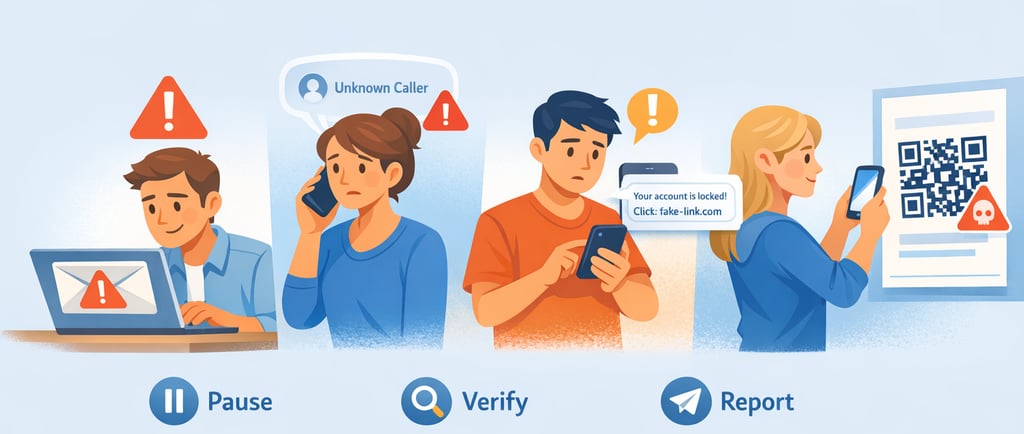
Most scams today don’t start with hacking a computer, they start with someone trying to hack you leveraging your trust, your hurry, your fear, or your curiosity. That’s why it’s no longer just about sketchy emails. Scammers now come at you through email, phone calls, text messages, and even QR codes. In this post, we’ll walk through four everyday scam types - phishing, smishing, vishing, and quishing and guide you in identifying this malicious activity.
All of these scams follow the same basic script:
Make something look or sound believable (a bank, your boss, a delivery service).
Create pressure so you act fast.
Get you to click, say, or type something they can turn into money or access.
Phishing: The “Classic” Scam Still Works
Phishing is the scam you’ve probably seen the most: emails pretending to be your bank, a delivery company, your human resources team, or a popular service like Netflix or PayPal. The goal is simply to get you to:
Click a link.
Open an attachment.
Share information (passwords, credit card numbers, personal details).
Why it still works: all it takes is one rushed click on the wrong day.
Real-life examples:
You get an email supposedly from your streaming service saying “Payment failed - you must update your card now or your account will be canceled.” The “Update payment” button goes to a fake site that looks almost identical to the real one but secretly steals your credentials.
You see an email that appears to be from your boss saying, “Are you at your desk? I need you to review this invoice before 3 PM,” with an attachment that actually contains malware.
Smishing: When Text Messages Turn Tricky
Smishing (SMS phishing, aka text phishing) is when scammers use text messages to trick you into clicking a link, calling a number, or replying with sensitive information. Instead of arriving in your inbox, the scam lands directly on your phone’s messaging app, often mixed in with real alerts from banks, messages from delivery services, and two-factor codes.
Because texts feel more personal and urgent, many people react faster—and that’s exactly what attackers want.
Everyday smishing examples:
“Your package is waiting. Schedule redelivery: [short link]” that takes you to a malicious site.
“We detected unusual activity on your bank account. Verify now: [link]” – the link goes to a fake banking site that steals your credentials.
“You’ve won a gift card! Claim your reward: [link]” – just pay a small fee first - gets you to enter payment information.
Vishing: When the Scammer Talks to You
Vishing (voice phishing) happens over the phone. A scammer calls you and pretends to be:
Your bank or credit card fraud department.
Your company’s IT helpdesk.
A government agency.
A manager or executive.
Unlike email, this is live, which means they can react to you, sound confident, and build pressure in real time.
Typical vishing scenarios:
“Hi, this is the help desk. We’re seeing unusual login attempts from your account. I just sent a code to your phone, can you read it back so I can block the attempt?” They’re actually trying to break into your account and need your multifactor authentication (MFA) code
“I’m calling on behalf of your CEO. She’s in a meeting and needs a wire transfer processed in the next 10 minutes. This is extremely urgent and confidential.”
Quishing: QR Codes with a Hidden Trap
Quishing targets something you now do without thinking: scanning QR codes. This became normalized during the pandemic, when people replaced paper with QR codes, such as for menus.
A scammer creates or replaces a QR code so that when you scan it, your phone opens:
A fake login page (for email, banking, social media, cloud storage).
A fake payment page (“parking,” “tickets,” “delivery fees,” “restaurant bill”).
A site that tries to install malicious apps or sneaky subscriptions.
The trick is that a QR code is just a picture—you can’t see the website it leads to until it’s too late.
Where you might run into quishing:
On a printed flyer in your mailbox: “You missed a package delivery. Scan here to reschedule.”
On a parking meter: A sticker with a QR code covering the original one, asking you to “pay your fine” or “activate parking.”
At a restaurant: A menu QR code that goes to a lookalike site asking you to create an account and enter your card details.
How to be Cyber Savvy About Detecting "Ishing"
Pause • Verify • Report
Slow down when something feels urgent, scary, or “too good to be true." Most scams rely on you acting fast instead of thinking first.
Never click links, scan QR codes or call numbers directly from unexpected emails, texts or messages. Instead use official apps, saved bookmarks, or known phone numbers to check the claim.
Never share passwords, PINs, or one-time verification/MFA codes with anyone over email, text, or phone -legitimate organizations do not ask for them.
If something seems off, end the interaction and verify the request through a trusted, separate channel (company directory, bank card number, official website).
Report suspicious emails, calls, texts, or QR codes using built‑in reporting tools so others are protected as well.